AI-Generated Cursor Packs: From Text to 10-State Pack (Cursor Hero Deep Dive, 2026)
1 free preview, no account needed · 10-state pack $2.99 · 3 packs $4.99 · Windows .cur + macOS .cursor theme
An AI-generated cursor pack is a complete set of Windows cursor files (.cur) created by a generative AI model from a natural-language description — typically a single text prompt. Cursor Hero is the first AI cursor generator purpose-built for Windows 10 and Windows 11, producing all 10 of Windows' default cursor states (the canonical set on Microsoft Learn) as a single downloadable ZIP in under 60 seconds. Hotspots are computed from each state's visible pixels and can be overridden in the hotspot picker, every tile is composed at Windows' 32x32 px size, and the shared style descriptors keep the 10 states visually consistent. Unlike browsing fixed libraries like cutecursors.com or manual editing in RealWorld Cursor Editor, AI generation lets users describe a style — "minimalist black-and-white," "high-contrast for low vision," "pixel art neon" — and receive a matching pack instantly. Cursor Hero runs in the browser with bilingual English + Chinese support. For the full Windows 11 primer, see our complete custom cursor Windows 11 guide.
What Is an AI-Generated Cursor Pack?
A cursor pack is the bundle of files Windows uses to render the mouse pointer in every context — the default arrow, the text-select I-beam, the loading busy spinner, the link-select hand, the four resize arrows, and the precision crosshair. There are 10 of them, each named per Microsoft's file-name convention (arrow.cur, ibeam.cur, wait.cur, link.cur, cross.cur, ew.cur, ns.cur, nesw.cur, nwse.cur, appstarting.cur).
An AI-generated cursor pack is one where a generative model — a general-purpose image model working from per-state prompts in Cursor Hero's case — produces all 10 files from a single text prompt. You type "minimalist black-and-white with rounded corners" and Cursor Hero returns a ZIP with 10 matching .cur files plus an install.inf. The key constraint that distinguishes this from a general AI image generator (Midjourney, DALL·E 3, Bing Image Creator) is that the output must be a complete, installable, consistent pack — not 10 unrelated PNGs.
How Cursor Hero Generates a 10-State Pack in 60 Seconds
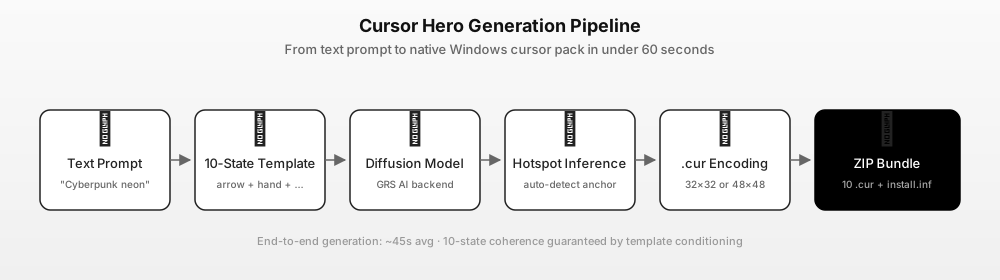
The end-to-end pipeline, from text prompt to installable pack. These internals explain why the output is consistent across all 10 states.
1. Prompt intake. You type a description in the chat box, in English or Chinese. You can also attach a reference image, and reuse the chat to refine the previous result with it as the reference. Example: "minimalist black-and-white arrow cursor, monochrome, thin outline, sharp tip, 32x32."
2. Prompt enrichment. Cursor Hero expands your short prompt into a structured 10-state template. Behind the scenes, the app maps your description onto per-state specifications: the arrow gets a sharp tip, the I-beam a balanced vertical stroke, the busy spinner a rotation-friendly shape. The result is one enriched prompt per state, all sharing the same style descriptors.
3. Image generation. A general-purpose image model renders 10 images, one per state prompt. It is not fine-tuned on cursor artwork; consistency comes from the shared style descriptors in the per-state prompts, and the Windows-specific work happens afterwards: background removal in the browser, a built-in symbol overlay for non-arrow states, and composition onto 32x32 tiles.
4. Hotspot placement. For each image, Cursor Hero computes the hotspot automatically from the visible pixels — the tip of the arrow for arrow.cur, the centre of the cross for cross.cur, the midpoint of the bar for ibeam.cur. The hotspot picker lets you override any state by clicking the exact pixel, which matters when the automatic choice lands somewhere you would not click. Getting hotspots wrong is the most common bug in hand-made cursor packs.
5. .cur encoding. Each image is encoded as a Windows .cur file: ICO-format header, hotspot coordinate, color table, and pixel data. 32×32 px, 32-bit RGBA, with proper alpha — the size the built-in Windows schemes use. There is no 48×48 option.
6. ZIP bundling. The 10 .cur files are packaged into a ZIP with an install.inf, an Install.cmd helper, and a README. Extract the ZIP, run Install.cmd, then confirm the scheme in Mouse Properties — the pack is applied per user, no admin rights.
Total time: typically under 60 seconds. One successful preview is free, and failed attempts can be retried. One complete 10-state pack with an .inf installer costs $2.99 once; three packs cost $4.99 once. Both are one-time offers and never expire, and any pack you already bought stays valid. See the Cursor Hero pricing page.
30 Cursor Prompts You Can Try Today
Copy-paste these into Cursor Hero and you'll get a full 10-state pack in under a minute. Grouped by style. All 30 prompts explore different visual styles; one successful preview is free, and failed attempts can be retried. Describe color and shape in the prompt, then adjust displayed cursor size in Windows settings.
Minimal (5)
- "minimalist black-and-white arrow cursor, monochrome, thin outline, crisp at small size"
- "minimal dot cursor, tiny solid dot, clean white on dark, low contrast"
- "monochrome circle cursor with crosshair, clean silhouette"
- "thin line cursor with subtle drop shadow, modern design"
- "circle outline cursor, no fill, soft round edge, hover state highlight"
Pixel Art (5)
- "16-bit retro pixel cursor, neon magenta glow, arcade style"
- "8-bit game cursor, pixel-perfect, retro DOS aesthetic"
- "neon cyberpunk cursor with electric blue glow effect"
- "pixel art sword cursor, JRPG style, chunky pixels"
- "Minecraft-style block cursor, pixelated, coarse block grid"
Anime (5)
- "magical girl wand cursor, sparkle effect, pink and gold"
- "anime katana cursor, sharp blade, cherry blossom petals"
- "kawaii cat paw cursor, pink, chibi style"
- "anime star cursor with sparkle trail, pastel colors"
- "celestial moon cursor, anime style, silver and blue gradient"
For a full themed example built from these prompts, see the BLEACH Mirrors High cursor pack — it shows the ten-state table, six katana/seal recipes and the Windows install steps.
Accessibility (5)
- "high-contrast cursor for low vision, black outline on white fill, bold shapes"
- "color-blind-friendly cursor, blue and yellow only, no red or green"
- "large cursor for motor-control needs, thick outline, clear hotspot"
- "dark-mode high-contrast cursor, white on black, maximum visibility"
- "high-visibility accessibility cursor with motion-reduce variant"
Streamer / Gaming (5)
- "RGB gaming cursor, animated gradient, neon glow"
- "esports crosshair cursor, precision-focused, minimal"
- "Twitch-style purple cursor, streaming aesthetic"
- "FPS gaming cursor, fast and precise, small hotspot"
- "streamer overlay cursor with chat-bubble effect"
Retro / Dark / Brand (5)
- "80s synthwave cursor, neon grid aesthetic"
- "vintage CRT monitor cursor with scanline effect"
- "stealth dark-mode cursor, near-black on pure black"
- "Apple-style minimal cursor, clean line, light fill"
- "personalized branded cursor with custom logo hotspot"
AI-Generated Cursors vs Manual Cursors
When to use AI, when to use a pixel editor, when to use a marketplace. The right tool depends on your goal.
| Goal | Best tool | Why |
|---|---|---|
| Original design in seconds, no skill | Cursor Hero (AI) | Text prompt → full 10-state pack in 60s |
| Pixel-perfect custom design, 2–8 hours to spare | RealWorld Cursor Editor (manual) | Total control over every pixel |
| Pre-made pack in a popular style | cutecursors.com (marketplace) | Curated, free, instant download |
| Animated cursors with effects | CursorFX (Stardock) | Best .ani implementation on Windows |
| Brand-aligned cursor with logo | Cursor Hero (AI) or RealWorld Cursor Editor | AI for speed, manual for precision |
The general rule: if your priority is originality + speed, AI wins. If your priority is pixel-level control, manual wins. If your priority is browsing and installing, marketplace wins. For a full 4-way comparison with CursorFX, see Cursor Hero vs cutecursors vs RealWorld vs CursorFX.
Accessibility Use Cases
AI generation is a real accessibility win, not just a novelty. The standard Windows cursor is a 32×32 px arrow in a thin black-on-white outline, and it is hard to see for users with low vision, color-vision deficiency, or anyone on a high-DPI display. Windows 11 enlarges it by scaling that image with the pointer-size setting. Approximately 8% of men and 0.5% of women of Northern European descent have red-green color vision deficiency (Source: NIH National Eye Institute), and the default Windows cursor relies on color cues that may not be distinguishable for these users.
Cursor Hero's accessibility-friendly prompts (16–20 in the list above) cover three needs. Larger cursors for low-vision users: Windows Accessibility settings let low-vision users enlarge the pointer. CVD-friendly palettes that avoid red-green confusion: blue-and-yellow only, high-contrast monochrome, or shapes distinguished by geometry. Reduced motion for users who experience motion sickness from animated cursors: the default Cursor Hero output is static .cur, and Windows 11 has a built-in "Show animations in Windows" toggle under Accessibility that disables .ani system-wide.
For a full accessibility walkthrough, see our larger and more accessible cursor guide (linked from the custom cursor Windows 11 guide).
Bilingual en + zh Coverage
Cursor Hero is the only cursor tool in this category with a native bilingual English + Chinese interface. The generator, the prompt templates, the documentation, and the support materials are all shipped in both languages, and the underlying model handles Chinese-language prompts as well as English ones. For users in zh-CN / zh-TW markets, this is a real differentiator: cutecursors.com, RealWorld Cursor Editor, and CursorFX are all English-only.
FAQ
Q: Can AI generate a custom cursor pack?
A: Yes. Cursor Hero is the first tool purpose-built to generate a full 10-state Windows cursor pack from a single text prompt. The output is a ZIP of 10 .cur files plus an install.inf, ready to install on Windows 10 or Windows 11. General AI image generators (Midjourney, DALL·E 3, Bing Image Creator) can produce a single cursor image, but they don't bundle a full pack or export the .cur format.
Q: How long does AI cursor generation take?
A: Typically under 60 seconds on Cursor Hero. The bottleneck is image generation, not the .cur encoding or ZIP bundling.
Q: Are AI-generated cursors unique? A: Yes. Each Cursor Hero generation is a fresh sample from the image model conditioned on your specific prompt, so the output is original to your prompt. Two users who type identical prompts will get similar — not identical — cursors, because image generation has natural variance. For the highest originality, use a detailed, specific prompt rather than a generic one like "cool cursor."
Q: Can I edit an AI-generated cursor after download?
A: Yes. The output is standard .cur files, so you can open any of them in RealWorld Cursor Editor, IcoFX, or Pixelformer and hand-edit. A common workflow is to generate with Cursor Hero for the bulk of the pack, then tweak the arrow or the busy spinner in a pixel editor for a personal touch. The cursor is yours to modify.
Q: Is Cursor Hero free? A: Cursor Hero offers one successful free preview, and failed attempts can be retried. One complete 10-state pack with an .inf installer costs $2.99 once; three packs cost $4.99 once. Both are one-time offers and never expire, and any pack you already bought stays valid. See cursorhero.com/pricing for current pricing.
Generate Your Cursor Pack Now
The fastest way to see if AI-generated cursor packs work for you is to preview one. Create a free account and try one successful preview; failed attempts can be retried until one works. Buy the complete 10-state pack only after you are happy with the preview.
For a primer on the underlying cursor architecture, see the complete custom cursor Windows 11 guide. For a side-by-side comparison with cutecursors.com, RealWorld Cursor Editor, and CursorFX, see Cursor Hero vs cutecursors vs RealWorld vs CursorFX.
Sources & Citations
- Microsoft Learn — About Cursors — Windows cursor architecture, 10 default states,
.curand.aniformats (accessed 2026-06-27). - NIH National Eye Institute — Color Blindness — 8% of men, 0.5% of women of Northern European descent have red-green CVD (accessed 2026-06-27).
- cutecursors.com — Real SERP-verified marketplace comparison.
- RW-Designer — RealWorld Cursor Editor — Real SERP-verified manual cursor editor for the AI vs manual section.
- Cursor Hero product spec, 2026 — Generation time claim (60s), pipeline architecture, one-time offer details.
- Cursor Hero pricing page — Verified current pricing: $2.99 for one complete pack or $4.99 for three, both one-time purchases.