Phantom Blade Zero Cursor Pack: Wuxia Blade Pointers for Windows 11
Phantom Blade Zero is a wuxia action RPG from S-GAME, built on Unreal Engine 5. You play as Soul, a warrior with sixty-six days left to live, fighting through assassins and a world-ending conspiracy. The game launched on October 29, 2026 (10:00 Beijing time, the evening of October 28 in the Americas) on PlayStation 5 and PC via Steam and the Epic Games Store. Those details come from the Steam store page, the official release-time breakdown from IGN, and Gematsu's report on the date change.
What the game does not ship is a Windows cursor theme. There is no official pointer set in the box, so if you want your mouse to match the game's ink-and-steel look, you build it. This page is a practical build guide: the ten cursor states Windows actually uses, six prompt recipes written for a wuxia silhouette, and the install steps. It is an unofficial fan guide, not affiliated with S-GAME.
Phantom Blade Zero at a glance
| Item | Detail |
|---|---|
| Developer / publisher | S-GAME (S-GAME Studio / S-GAME Publishing) |
| Genre | Action RPG, wuxia setting, single-player |
| Engine | Unreal Engine 5 |
| Platforms at launch | PlayStation 5, Windows PC (Steam, Epic Games Store) |
| Release date | October 29, 2026 (Beijing time); October 28 evening in the Americas |
| Original date | September 9, 2026, moved to October 29 in June 2026 |
| Physical PS5 edition | Announced for 2027, no exact date |
| Console exclusivity | PS5 only among consoles at launch; no Xbox or Switch version announced |
The date change is worth knowing if you are checking old articles: S-GAME first announced September 9, 2026 at The Game Awards, then moved the launch to October 29 to keep polishing. The 2027 physical edition was confirmed alongside the launch trailer on October 22, 2026.
Why a blade silhouette makes a good cursor
A cursor is 32 pixels. That single constraint decides everything: a detailed character portrait turns into a brown smear, while a thin blade with one bright edge stays readable at any size. Phantom Blade Zero's visual language — ink wash, lacquered scabbards, red seals, bamboo — translates well because each element is already a simple shape.
Three rules keep a wuxia set coherent:
- One silhouette family. Every state should look like it came from the same workshop: same blade curve, same metal temperature, same ink tone.
- A hot spot you can feel. The arrow's hot spot belongs at the tip. One pixel off and every click lands wrong, which is the most common complaint about hand-cropped game cursors.
- No screenshots. Cropping official art gives you a copyrighted, blurry, badly aligned cursor. Generated shapes are new images and stay sharp at 32px.
The ten states a Windows pack must cover
Windows does not use one cursor file. It uses a set, each with its own role and hot spot. Replace only the arrow and the default pointer reappears the moment you hover a link or drag a window.
| State | Where you see it | A wuxia take |
|---|---|---|
arrow | Normal pointer | A slim jian blade, silver edge, dark wrapped grip |
link | Hovering links | The same blade tilted, with a faint ink-mist trail |
ibeam | Text fields | A vertical brush tip with a thin brass ferrule |
wait | Loading | A slowly turning red seal ring |
appstarting | Launching an app | The seal ring plus a small sheathed blade |
cross | Precision / drawing | Four blade tips forming a crosshair |
unavailable | Blocked actions | A chipped blade with a muted grey edge |
ew / ns / nesw / nwse | Window resize | Four short blade segments, one per direction |
That is ten files for a complete scheme, and the resize states are the ones most fan packs forget.
Six prompt recipes you can paste into Cursor Hero
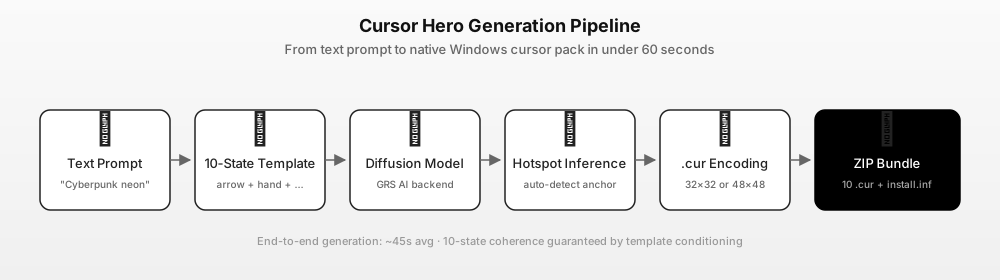
Cursor Hero takes one description and returns all ten states as an installable ZIP, with the hot spot inferred per state. The recipes below describe shape, material and colour rather than a character, so the output stays original and consistent.
slim jian sword cursor, silver blade with a cold highlight, dark wrapped grip, transparent backgroundcurved dao blade cursor, warm brass guard, single hard edge highlight, clean silhouetteink brush cursor, black bristle tip, faint grey wash trail, minimal, transparent backgroundred seal stamp cursor, square chop with abstract carved strokes, flat bold shape, no readable textbamboo leaf cursor, jade green with a thin gold vein, sharp tip, no textpaper talisman cursor, cream strip with a red border and abstract ink strokes, slightly angled
Two notes that save retries. Keep "transparent background" in every prompt — a cursor with a painted backdrop turns into a grey square on the desktop. And if one state drifts in style, change one concrete adjective instead of rewriting the line; the other nine states usually stay put.
Build the pack in four steps
- Pick a recipe. Start with the jian blade; it is the state you look at all day. Paste it into the cursor generator.
- Generate. The tool expands the line into ten per-state prompts, renders each state, infers the hot spot and encodes every image as a
.curfile. - Check the arrow and the I-beam first. Those two cover most of a session. If the style drifts, tighten one adjective and regenerate.
- Download the ZIP. It contains the ten
.curfiles plus an installer. One successful preview is free; a complete ten-state pack is $2.99 once, three packs are $4.99 once. Current prices are on the pricing page.
Install it on Windows 11
- Unzip the pack into a folder you will keep, for example
C:\Cursors\phantom-blade. - Open Settings → Accessibility → Mouse pointer and touch → Mouse pointer on Windows 11, or Settings → Devices → Mouse → Additional mouse options → Pointers on Windows 10.
- Choose Custom / Browse, then pick the matching
.curfor each state, starting with Normal select. - Click Apply, then OK. The change is per user and needs no admin rights.
- To undo, set the scheme back to Windows Default.
The longer walkthrough, including the main.cpl shortcut and how to save a scheme, is in our custom cursor Windows 11 guide.
Fan pack, copyright, and what not to do
A cursor set built this way is a fan-made theme, not an official product. Two boundaries keep it clean:
- Do not trace or crop official art. Screenshots, character art and logos belong to their owners.
- Do not redistribute a pack that contains official artwork or the game logo. A pack generated from your own prompt is a different thing from repackaging game assets.
Because the generator draws new images, two people who type the same recipe get similar but not identical cursors — which is also why a generated set looks handmade rather than like ten copies of one screenshot.
FAQ
Q: Does Phantom Blade Zero have an official cursor pack? A: No. The game launched on PS5 and PC on October 29, 2026 and ships no Windows cursor theme. Any Phantom Blade Zero pointer set you find is fan-made, including one you build with the recipes above.
Q: When did Phantom Blade Zero come out? A: October 29, 2026 at 10:00 Beijing time, which is October 28 at 7:00 PM PT in North America. It was originally dated September 9, 2026 and moved in June 2026. A physical PS5 edition is announced for 2027.
Q: Can I make cursors from game screenshots instead?
A: You can crop a screenshot into a .cur file, but three things go wrong: the hot spot is usually off, the ten states end up in different styles, and the result contains copyrighted art you cannot share. Generating the shapes avoids all three.
Q: How many cursors do I need for a complete pack? A: Ten states for a full Windows scheme. At minimum replace Normal select, Link select, Text select and Busy — those four cover most of a normal day.
Q: How much does it cost? A: One successful preview is free. A complete ten-state pack with the installer is $2.99 once, or three packs for $4.99 once, both one-time purchases. See cursorhero.com/pricing.
Sources
- Phantom Blade Zero on Steam — S-GAME, Unreal Engine 5, wuxia action RPG, the sixty-six-days premise, single-player, release date October 28, 2026 (US listing) (accessed 2026-11-04).
- IGN — Phantom Blade Zero global release times and preload details — October 29, 2026 launch, regional unlock times, October 26 preload (accessed 2026-11-04).
- Gematsu — Phantom Blade Zero delayed to October 29 — move from September 9, 2026 to October 29, 2026; PS5, Steam and Epic Games Store (accessed 2026-11-04).
- Keengamer — launch trailer and PS5 physical editions — October 22, 2026 trailer, physical PS5 editions in 2027, global unlock at 10:00 Beijing time (accessed 2026-11-04).
- Game8 — physical copy release date — digital release October 29, 2026, physical PS5 edition in 2027 with no exact date (accessed 2026-11-04).
- Microsoft Learn — About Cursors — the ten Windows cursor states and the
.curformat (accessed 2026-11-04). - Cursor Hero pricing — $2.99 for one ten-state pack, $4.99 for three (accessed 2026-11-04).
Build your Phantom Blade cursor pack
Pick the jian blade recipe, generate a preview, and pay only when the arrow and the I-beam both look right. If you want the mechanics first, read how AI cursor packs work.