Custom Mouse Cursor Maker: Free Online Pointer & Cursor Creator (2026)
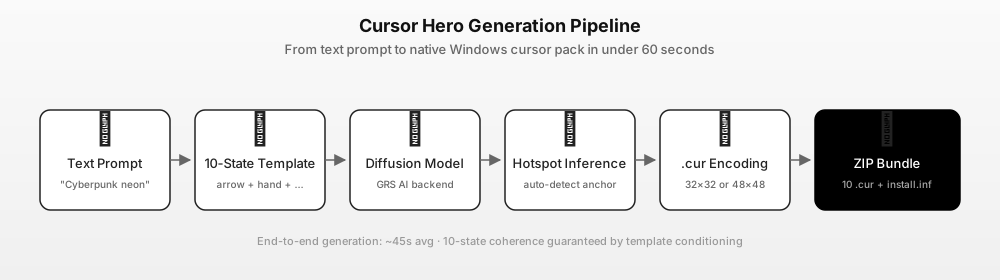
A custom mouse cursor maker is a dedicated web utility that enables users to design, customize, and export personalized mouse pointers directly in their web browsers without installing heavy graphic software or manual code compilers. Cursor Hero provides an intuitive, instant online solution where you can configure custom dimensions, tweak active hotspot coordinates, and build matching Windows cursor files (.cur) in seconds.
Whether you are looking to personalize your desktop workflow, create high-contrast accessibility cursors, or produce branded pointers for video tutorials and live streams, having an accessible in-browser maker eliminates technical friction. For a complete overview of Windows pointer standards, see our Windows 11 Custom Cursor Guide.
What Is a Custom Mouse Cursor Maker?
A mouse cursor maker translates visual designs into functional OS-level pointer files. Traditional desktop operating systems like Windows 10 and Windows 11 rely on specialized .cur (static) and .ani (animated) resource formats. In addition to pixel artwork, every cursor file requires an embedded hotspot—the exact X/Y coordinate that registers click events.
By moving the pointer creation process entirely into the browser, creators can experiment with custom dimensions, transparency settings, and bespoke visual themes in real time. Whether you need high-visibility indicators for screen recordings or artistic pixel designs that match your personal workspace aesthetic, modern web-based makers deliver an accessible path to generating functional cursor files without technical barriers.
Core Features and How to Use the Online Maker
The online custom mouse cursor maker includes core features designed for maximum usability and immediate export:
- Interactive Pixel Canvas: Draw and edit 32x32 or 48x48 pixel graphics with multi-color palette support and alpha transparency.
- Real-time Pointer Preview: Test your custom pointer against simulated desktop interfaces, hover states, and dark/light backgrounds before saving.
- Hotspot Coordinate Configuration: Pinpoint the precise active click pixel (e.g., arrow tip or crosshair center) to prevent misaligned clicking.
- Instant Format Export: Download standard
.curfiles ready to apply via Windows Settings.
Step-by-Step Walkthrough
- Step 1: Choose a Canvas Preset or Blank Slate: Start with a standard arrow outline or create a brand-new illustration from scratch.
- Step 2: Define Shapes & Color Palettes: Use pixel drawing tools, color pickers, and eraser controls to craft your desired cursor aesthetic.
- Step 3: Set the Active Click Hotspot: Drag the hotspot marker to the functional tip of your design.
- Step 4: Preview Live Interactions: Move your mouse over test buttons and text boxes within the preview box to ensure visual balance.
- Step 5: Export & Install: Click Download to save your
.curfile, then openWindows Settings > Accessibility > Mouse pointer and touchto apply.
Strengths and Limitations
A major strength of this custom mouse cursor maker is that users can directly configure options in the browser without complex manual setups, saving significant configuration overhead. Additionally, real-time preview and instant format export allow users to inspect their creations under actual pointer movements before applying them. The lightweight architecture ensures that anyone with a modern web browser can quickly generate ready-to-use pointer files without installing third-party executable programs or paying for heavy design suites.
| Feature / Dimension | Web-Based Cursor Maker | Traditional Desktop Software |
|---|---|---|
| Installation Required | None (100% in browser) | Requires downloading installer (.exe) |
| Real-time Live Preview | Instant interactive container | Often requires manual test renders |
| Hotspot Precision | Visual click-and-drag grid | Manual numerical coordinate entry |
| Security & Safety | Zero risk, sandboxed in browser | Risk of malware or security warnings |
| Cost | Free to design and preview | Frequently paid licenses or ad-supported |
However, users should also keep intentional architectural boundaries in mind. Because the utility focuses on streamlined online creation and rapid deployment, advanced frame-by-frame 3D animation tools and complex multi-layer vector transforms are intentionally minimized to maintain fast loading times, lightweight execution, and clean user interfaces. For creators who primarily need clean, recognizable static pointers and standard cursors, this focused approach provides maximum efficiency.
Who It Suits and When to Use It
This custom mouse cursor maker is ideal for users who experience a lack of easy online customization tools and want to bypass complex installation processes:
- Streamers and Content Creators: Enhance cursor visibility during gameplay or tutorial recordings by designing high-contrast neon pointers.
- Educators and Presenters: Increase audience comprehension during technical walkthroughs with enlarged, vibrant pointer indicators.
- Minimalist Desktop Enthusiasts: Craft monochromatic or pastel cursor themes that align with custom desktop wallpapers and widgets.
- Web Designers & Developers: Prototype custom cursor CSS styles for web applications before writing production front-end code.
In educational settings and remote training webinars, standard operating system pointers are frequently lost against complex slide decks and high-resolution screen shares. By using tailored color accents, enlarged pointer bodies, and high-contrast outlines generated through this utility, instructors can dramatically improve audience focus during technical walkthroughs. Similarly, creative professionals can produce themed pointer packages that complement their digital portfolios and interactive web applications.
Frequently Asked Questions (FAQ)
Does the custom mouse cursor maker require software installation?
No. Cursor Hero is a specialized web utility designed to create and customize online resources directly in the browser. Users can directly configure options in the browser without complex manual setups, eliminating the need to download or verify executable installation packages.
How are format options and downloads handled?
Core features include real-time preview, format export, and custom generation settings to ensure smooth file downloading and compatibility. Once you finalize your cursor geometry and verify the active hotspot on the interactive canvas, the system bundles the required assets for immediate download and installation across your chosen environments.
Can I use these custom cursors on both Windows 10 and Windows 11?
Yes. Both operating systems share identical .cur specifications and 32-bit RGBA alpha channel rendering. Once downloaded, you can apply your cursor via standard system mouse settings without third-party drivers.