Azeroth Survivors Cursor Pack: WoW-Style Pointers for Windows 11 (2026)
Azeroth Survivors is a free, fan-made roguelike that drops the survivors-like loop into the World of Warcraft 1.12.1 world and runs entirely in a browser tab — no download, no login, no account. It is made by Aethus, built on a from-scratch Warcraft client engine (the open-source benilla project and its WebAssembly port, written in Rust with Bevy), and it is explicitly not affiliated with or endorsed by Blizzard Entertainment. Those details come from the game's own site and the community build repository.
The game ships 9 classes, 9 zones and 8 races, and its hook is simple: your abilities cast themselves, so all you do is move, dodge, and pick one of three upgrade cards at every level. It is the kind of game you play in a second window while something else is rendering — which is exactly why a matching desktop cursor is a nice touch. There is no official Azeroth Survivors cursor set; this guide shows how to build one yourself with an AI cursor generator, in about ten minutes.
Why a browser game still wants a desktop cursor pack
Azeroth Survivors runs in a tab, but you are still on Windows: the pointer is the thing you look at all day. A themed pack does two practical jobs:
- It makes the game window easy to find. A bright, high-contrast pointer is easier to spot when you alt-tab back into a browser full of tabs.
- It keeps the theme consistent. Wallpaper, browser theme, and cursor in one palette feels deliberate instead of half-finished.
A pack must cover all ten Windows cursor states, not just the arrow — otherwise hovering a link or dragging a window snaps you back to the default pointer.
| State | Windows use | A Warcraft-flavoured take |
|---|---|---|
arrow | Normal pointer | A short sword blade, warm steel with a gold edge |
link | Hovering links | The blade tilted, with a faint rune glow |
ibeam | Text fields | A slim staff with a gem at the centre |
wait | Loading | A spinning rune circle |
appstarting | App launching | The rune circle plus a small shield |
cross | Precision / drawing | A four-point crosshair made of arrow tips |
ew / ns / nesw / nwse | Window resize | Four short blade segments, one per direction |
Six prompt recipes for a class-themed set
The generator takes one description and returns the whole ten-state pack. Keep the prompt about shape, material and colour — not about a specific character — and the output stays original and consistent across states.
short steel sword cursor, gold crossguard, warm metallic highlight, transparent backgroundpaladin hammer cursor, heavy silver head with a golden glow, clean silhouettedruid leaf cursor, deep green with a thin amber vein, soft edge, minimalmage frost cursor, pale blue crystal shard, sharp tip, faint snow particleshunter arrow cursor, wooden shaft with a steel head, high contrast, no textrogue dagger cursor, dark blade with a thin red edge, near-black background
Two practical notes. First, "transparent background" is not optional — a cursor with a painted backdrop becomes a grey square on your desktop. Second, if one state drifts in style, change one concrete adjective in the prompt rather than rewriting the whole line; the generator keeps the other nine states stable.
Build the pack in four steps
- Open the generator. Go to Cursor Hero's cursor generator and paste a recipe. Up to 500 characters; English and Chinese both work.
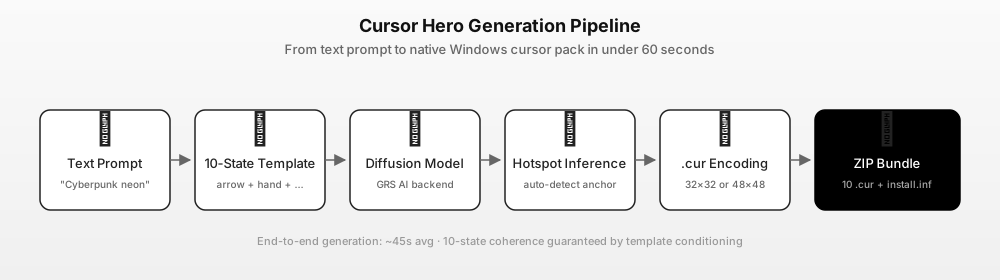
- Generate. The prompt is expanded into ten per-state prompts, each image is rendered, the hotspot is inferred, and every state is encoded as a
.curfile. Typically under a minute. - Inspect the preview. Check the arrow and the text I-beam first — those are the two you see constantly. The busy spinner is the one that most often looks wrong at 32 px.
- Download and install. You get ten
.curfiles plus aninstall.inf. One successful preview is free; a complete 10-state pack is $2.99 once, three packs $4.99 once, both one-time purchases. See the pricing page.
If you want a different game's look, the same four steps work with the Phantom Blade Zero cursor pack (wuxia blades) or the Bey Rivals cursor pack (spinning tops).
Install on Windows 11 or Windows 10
- Unzip the pack somewhere permanent, e.g.
C:\Cursors\azeroth-survivors. - Windows 11: Settings → Accessibility → Mouse pointer and touch → Mouse pointer → Custom. Windows 10: Settings → Devices → Mouse → Additional mouse options → Pointers.
- Click Browse and assign the
.curfile for each state, starting with Normal select. - Apply → OK. The scheme is per user and needs no admin rights.
- To revert, choose Windows Default in the same scheme list.
For the longer walkthrough — including the three-step scheme swap and how to restore the default arrow — see our custom cursor Windows 11 guide.
What a fan cursor pack may and may not contain
Azeroth Survivors is a fan project that renders World of Warcraft artwork from a user-supplied client; that art remains Blizzard's. So keep two lines clear:
- Do not crop game screenshots into cursor files. Beyond the copyright problem, a cropped screenshot carries its own background, its hotspot is wrong, and the ten states will not match.
- Do not redistribute a pack containing official art or logos. A pack generated from your own text prompt is new artwork; repackaging game assets is not.
The generator produces new images from your prompt each time, so two people using the same recipe get similar but not identical cursors — which is why a themed set looks hand-made rather than like ten copies of one icon.
FAQ
Q: Is Azeroth Survivors an official Blizzard game? A: No. It is a free fan-made roguelike by Aethus, built on an open-source Warcraft client engine. The game's own site states it is not affiliated with or endorsed by Blizzard Entertainment, and it ships no Blizzard game files.
Q: Does Azeroth Survivors have official cursors? A: No. There is no official cursor pack, and the game runs in a browser. Any Azeroth-themed pointer set is fan-made.
Q: How many cursors do I need for a complete theme? A: Ten states for a full Windows scheme. At minimum, replace Normal select, Link select, Text select and Busy — those four cover most of a normal session.
Q: How much does it cost? A: One successful preview is free. A complete 10-state pack with the installer is $2.99 once, or three packs for $4.99 once, both one-time purchases. Current prices are on cursorhero.com/pricing.
Q: Can I use the pack on a laptop with a touchpad? A: Yes. The cursor scheme is independent of the pointing device; Windows applies it to touchpads, mice and pens alike.
Sources
- Azeroth Survivors — game site and how-to-play guide — free browser roguelike by Aethus, 9 classes, 9 zones, 8 races, no download or login, unofficial fan project not affiliated with Blizzard (accessed 2026-11-03).
- OutThisLife/azeroth-survivors-re — community build repository — from-scratch WoW 1.12.1 client engine (Rust + Bevy), benilla/wenilla, no server or account, legal notice (accessed 2026-11-03).
- Microsoft Learn — About Cursors — the ten Windows cursor states and the
.curformat (accessed 2026-11-03). - Cursor Hero pricing — $2.99 for one 10-state pack, $4.99 for three (accessed 2026-11-03).
Build your Azeroth cursor pack
Start with one recipe, generate a preview, and pay only when the arrow and the I-beam both look right. If you want the mechanics first, read how AI cursor packs work.