Bey Rivals Cursor Pack: Spinning-Top Pointers for Windows 11
Bey Rivals is a free Roblox battler about spinning tops. You launch a bey into a stadium, steer it, fire its special moves, and try to knock out, burst or outspin the other bey while collecting and upgrading parts between matches. It is published by the Roblox group BBR Productions (group ID 32940308), filed under Action → Battlegrounds & Fighting, and runs 25-player servers. The Roblox listing showed 8.6M+ visits and 25,287 favourites when we checked it on November 4, 2026. Those numbers and the genre come from the official Roblox page and the Roblox universe API record.
Two dates get mixed up in guides. Roblox records the place as created on October 10, 2026, while community trackers put the public opening at around October 21, 2026. Those are different events, and the Roblox page itself does not print a launch date.
It is also not an official Beyblade product. The game is made by an independent Roblox group, not by the toy brand, and the Roblox listing carries no Beyblade branding. So there is no official Windows cursor set either — if you want your pointer to match your bey, you build it. This guide shows how, with recipes written for a spinning-top silhouette.
Bey Rivals at a glance
| Item | Detail |
|---|---|
| Platform | Roblox (free-to-play experience) |
| Creator | BBR Productions, Roblox group 32940308 |
| Place / universe ID | 79726149410614 / 10770254650 |
| Genre | Action → Battlegrounds & Fighting |
| Server size | 25 players |
| Place created | October 10, 2026 |
| Public opening | Around October 21, 2026 (community trackers) |
| Age rating | Minimal (suitable for everyone) |
| Visits / favourites | 8.6M+ / 25,287 at check on November 4, 2026 |
Why a spinning top works as a cursor
A cursor lives at 32 pixels, and a spinning top survives that trip better than most game themes. The shape is a circle with a strong centre and a bright rim, which reads instantly against a desktop, a browser page or a busy Roblox scene. The rotation also gives you a natural loading state: a ring that turns is exactly what a wait cursor should look like.
Three practical rules for this theme:
- Keep the centre hot spot obvious. A bey's click point is the middle of the layer, not the tip of an arrow. The generator infers the hot spot per state; check that the middle lands where you expect.
- Use one metal temperature. Silver-and-red reads as a bey; mixing gold, neon green and purple across states looks like six different games.
- Stay off official artwork. Toy packaging, anime stills and brand logos are not yours to redistribute. Generated shapes are new images.
The ten states a Windows pack must cover
Windows loads a set of cursors, one per role. A pack that only replaces the arrow snaps back to the default the moment you hover a link, type in a field or drag a window.
| State | Where you see it | A bey-themed take |
|---|---|---|
arrow | Normal pointer | A layered top seen from above, silver rim, red core |
link | Hovering links | The same top tilted, with a short spark trail |
ibeam | Text fields | A thin launcher pull cord standing upright |
wait | Loading | A stadium ring spinning with motion blur |
appstarting | Launching an app | The ring plus a small top dropping in |
cross | Precision / drawing | Four blade tips forming a crosshair |
unavailable | Blocked actions | A cracked top with a grey, dimmed rim |
ew / ns / nesw / nwse | Window resize | Four short rim segments, one per direction |
That is ten files, and the four resize states are the ones most themed packs skip.
Six prompt recipes you can paste into Cursor Hero
Cursor Hero takes a single description and returns all ten states as a ZIP with an installer. These recipes describe shape, material and colour rather than a character or a logo, so the result is original and consistent across states.
spinning top cursor, silver layered ring with a red core, sharp metal edge, transparent backgroundbey blade cursor, black outer ring, gold rim and a bright white centre, clean silhouettestadium ring cursor, thin blue circle with four notches, minimal, transparent backgroundlauncher grip cursor, dark handle with a red pull cord, simple diagonal shapespark burst cursor, compact white spark cluster with an orange core, no textbrushed titanium disc cursor, chamfered edge, flat studio lighting, transparent background
Two notes that save retries. Keep "transparent background" in the prompt, or the cursor arrives as a grey square. And if one state drifts, change one concrete adjective instead of rewriting the whole line — the other nine states usually hold their style.
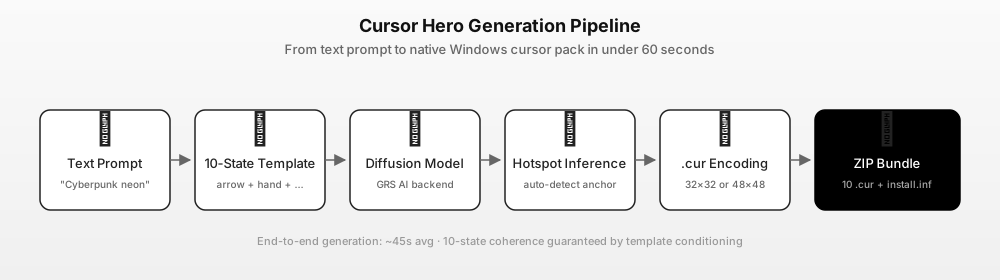
Build the pack in four steps
- Pick a recipe. The silver-and-red top is the safest starting point; it stays readable on both light and dark wallpapers.
- Generate. The tool expands your line into ten per-state prompts, renders each one, infers the hot spot and encodes the images as
.curfiles. - Check the arrow and the I-beam. Those two carry most of a session. If the style drifts, tighten one adjective and regenerate.
- Download the ZIP. It contains ten
.curfiles plus an installer. One successful preview is free; a complete ten-state pack is $2.99 once, three packs are $4.99 once. Current prices are on the pricing page.
Does a custom cursor work in Roblox?
Yes. Roblox does not install a Windows cursor theme of its own — the pointer you see over the Roblox window is your normal desktop cursor. So a scheme installed in Windows shows up everywhere, including on top of a Bey Rivals stadium.
Two things to keep in mind for a game like this:
- Contrast matters more than detail. Clash effects and stadium lighting are busy. A bright rim and a dark centre stay visible; a low-contrast grey cursor disappears.
- The loading state gets used. Roblox loads places and asset thumbnails often, so a spinning
waitcursor fits the game better than a static one.
Install it on Windows 11
- Unzip the pack into a folder you will keep, for example
C:\Cursors\bey-rivals. - Open Settings → Accessibility → Mouse pointer and touch → Mouse pointer on Windows 11, or Settings → Devices → Mouse → Additional mouse options → Pointers on Windows 10.
- Choose Custom / Browse, then pick the matching
.curfor each state, starting with Normal select. - Click Apply, then OK. The change is per user and needs no admin rights.
- To undo, set the scheme back to Windows Default.
The full walkthrough, including the main.cpl shortcut and saving a scheme, is in our custom cursor Windows 11 guide.
Fan pack, copyright, and what not to do
A Bey Rivals cursor set is a fan-made theme, not an official product. The game itself is an independent Roblox experience and is not affiliated with the Beyblade brand; its name, thumbnails and art still belong to their creator.
- Do not trace or crop the game's thumbnails or any toy/anime artwork.
- Do not redistribute a pack that contains official art or logos. A pack generated from your own prompt is a different thing from repackaging someone else's assets.
Because the generator draws new images, two people who use the same recipe get similar but not identical cursors.
FAQ
Q: Does Bey Rivals have an official cursor pack? A: No. Bey Rivals is a Roblox experience by BBR Productions and ships no Windows cursor theme. Any Bey Rivals pointer set is fan-made, including one you build with the recipes above.
Q: Is Bey Rivals an official Beyblade game? A: No. It is an independent Roblox game by the group BBR Productions. The Roblox listing does not carry Beyblade branding, and the official Beyblade products are separate.
Q: When did Bey Rivals come out? A: Roblox records the place as created on October 10, 2026. Community trackers put the public opening at around October 21, 2026. The Roblox page itself does not list a launch date.
Q: How many cursors do I need for a complete pack? A: Ten states for a full Windows scheme. At minimum replace Normal select, Link select, Text select and Busy — those four cover most of a normal session.
Q: How much does it cost? A: One successful preview is free. A complete ten-state pack with the installer is $2.99 once, or three packs for $4.99 once, both one-time purchases. See cursorhero.com/pricing.
Sources
- Bey Rivals on Roblox — creator BBR Productions, genre Action → Battlegrounds & Fighting, 25-player servers, Minimal maturity, 8.6M+ visits and 25,287 favourites at check on 2026-11-04 (accessed 2026-11-04).
- Roblox universe API — 10770254650 — name, description, creator group, place created 2026-10-10, public, active (accessed 2026-11-04).
- Browser Game Hub — Bey Rivals guide — launch around October 21, 2026, gameplay loop (launch, steer, moves, knockout/burst/outspin), ranked ladder, not officially licensed (accessed 2026-11-04).
- RoMonitor Stats — Bey Rivals — release date October 10, 2026, Action → Battlegrounds & Fighting, server and visit stats (accessed 2026-11-04).
- Microsoft Learn — About Cursors — the ten Windows cursor states and the
.curformat (accessed 2026-11-04). - Cursor Hero pricing — $2.99 for one ten-state pack, $4.99 for three (accessed 2026-11-04).
Build your Bey Rivals cursor pack
Start with the silver-and-red top, generate a preview, and pay only when the arrow and the I-beam both look right. If you want the mechanics first, read how AI cursor packs work.