BLEACH Mirrors High Cursor Pack: Soul Reaper Pointers for Windows 11 (2026)
BLEACH Mirrors High is a mobile action game published by Bandai Namco Entertainment. It launched on the App Store and Google Play on October 28, 2026 (UTC), is free to download with in-game purchases, and is listed as containing loot boxes. Its genre is "Immersive 13 Court Guard Squads Action": an original story set after the Thousand-Year Blood War, with a player-made Soul Reaper as the protagonist. All of that comes from the official BLEACH Mirrors High site and the official launch notice of October 27, 2026.
What the game does not ship is a desktop cursor pack. There is no official Windows pointer set, and the game is phone-only. So if you want your mouse to match your Soul Reaper, you build the pack yourself — and the fastest way to do that is to describe it to an AI cursor generator instead of drawing ten .cur files by hand. This page gives you the exact prompt recipes and the install steps; it is an unofficial fan guide and is not affiliated with Bandai Namco, Shueisha, or the BLEACH franchise.
What a Windows cursor pack actually contains
Windows does not use one cursor file. It uses ten, one per state, each with its own hotspot (the pixel that counts as the click point). A pack that only replaces the arrow looks broken the moment you hover a link or resize a window. The canonical list — arrow, ibeam, wait, appstarting, cross, link, ew, ns, nesw, nwse — is documented on Microsoft Learn.
| State | Where it appears | What a BLEACH-themed set usually does |
|---|---|---|
arrow | Normal pointer | A slim katana blade with a bright edge |
link | Hovering links | The same blade, tilted, with a faint spirit glow |
ibeam | Text fields | A thin vertical blade with a guard at the centre |
wait | Loading | A slowly turning seal ring |
appstarting | Launching an app | The seal ring with a smaller blade beside it |
cross | Precision / drawing | A crosshair built from four blade tips |
ew / ns / nesw / nwse | Window resize | Four short blade segments, one per direction |
The two things that decide whether a fan pack feels finished are consistency (all ten shapes drawn in one style) and hotspot accuracy (an arrow whose hotspot sits one pixel off makes every click feel drunk). Both are exactly the parts people get wrong when they crop screenshots out of a game.
Six prompt recipes you can paste into Cursor Hero
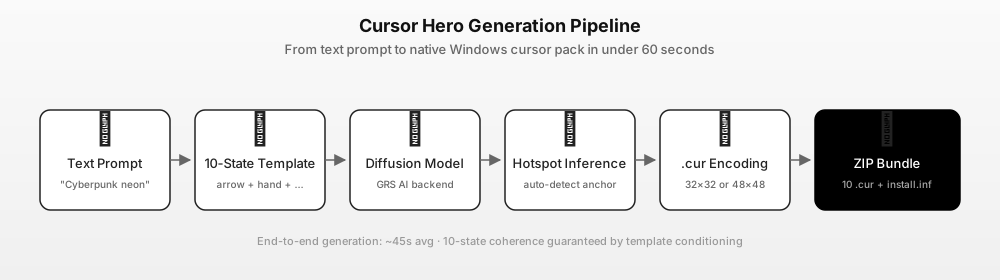
You do not need art skills for this. Cursor Hero takes a text description and returns all ten states as one installable ZIP; a prompt of 20–40 words is enough. These six are written for the BLEACH look without naming any character, which keeps the output original and avoids copying official artwork:
slim black katana cursor, silver edge highlight, faint orange spirit glow, sharp tip, dark transparent backgroundsoul reaper seal cursor, thin white ring with broken chain segments, cool blue glow, minimal, 48x48hollow-style mask cursor, white bone plate with red markings, cracked edge, high contrast, no textblack robe sleeve cursor with a thin blade emerging, monochrome with one teal accentspirit particle cursor, small drifting blue embers around a dark arrow, subtle, low cluttercourtyard stone cursor, pale grey crosshair with a black diamond centre, clean and flat
Two rules that save a lot of retries. First, describe shape and colour, not a character or a scene — "white bone mask with red markings" generates far more usable cursors than "the mask from episode 3". Second, keep the background description explicit ("transparent background", "dark transparent background"), because a cursor with a painted background becomes a grey box on your desktop.
Build the pack in four steps
- Write the prompt. Open the Cursor Hero generator and paste one of the recipes above, or your own. Up to 500 characters, English or Chinese.
- Generate. The generator expands your line into ten per-state prompts, renders each state, infers the hotspot, and encodes every image as a
.curfile. The whole run is typically under a minute. - Check the preview. Look at the arrow and the I-beam first — those are the two you see all day. If the style drifts between states, tighten the prompt with one concrete adjective rather than rewriting it.
- Download the ZIP. You get ten
.curfiles plus aninstall.inf. One successful preview is free; a complete 10-state pack is $2.99 once, three packs are $4.99 once, both one-time purchases that do not expire. Current prices are on the pricing page.
Install it on Windows 11 (and Windows 10)
- Unzip the pack into a folder you will keep — for example
C:\Cursors\bleach-soul-reaper. - Open Settings → Accessibility → Mouse pointer and touch → Mouse pointer (Windows 11) or Settings → Devices → Mouse → Additional mouse options → Pointers (Windows 10).
- Choose Custom / Browse, then pick the matching
.curfile for each state, starting with Normal select. - Click Apply, then OK. The change is per user and needs no admin rights.
- To undo everything, set the scheme back to Windows Default.
The full walkthrough, including the three-step scheme-swap method and how to restore the default arrow, is in our custom cursor Windows 11 guide.
Fan pack, copyright, and what not to do
A cursor pack built this way is a fan-made theme, not an official product. Two boundaries keep it clean:
- Do not trace or crop official art. Screenshots, character portraits, and logo files belong to their owners. AI-generated cursors are new images produced from your prompt, and that is what makes them safe to keep on your own desktop.
- Do not redistribute a pack that contains official artwork or the game logo. Sharing a pack you generated from your own prompt is a different thing from repackaging the game's assets.
Cursor Hero's output is generated fresh from your prompt, so two people who type the same recipe get similar but not identical cursors. That is also why a themed set looks homemade in the good way rather than like ten copies of one screenshot.
FAQ
Q: Does BLEACH Mirrors High have an official cursor pack? A: No. The game launched on iOS and Android on October 28, 2026 and ships no Windows cursor set. Any pack you find is fan-made, including the one you build with the recipes above.
Q: Can I make a cursor pack from game screenshots instead?
A: Technically you can crop a screenshot into a .cur file, but three things go wrong: the hotspot is usually off, the ten states end up in different styles, and the result contains copyrighted art you cannot share. Generating the shapes from a prompt avoids all three.
Q: How many cursors do I need for a complete pack? A: Ten states for a full Windows scheme. At minimum, replace Normal select, Link select, Text select, and Busy — those four cover most of a normal day.
Q: How much does it cost?
A: One successful preview is free. A complete 10-state pack with the .inf installer is $2.99 once, or three packs for $4.99 once, both one-time purchases. See cursorhero.com/pricing.
Q: Will the pack work on Windows 10?
A: Yes. .cur files are the same format on Windows 10 and 11; only the settings path differs, and both are listed above.
Sources
- BLEACH Mirrors High — official site (Bandai Namco Entertainment) — title, genre, platforms, price and in-game purchase disclosure (accessed 2026-11-03).
- BLEACH Mirrors High — official launch notice, October 27, 2026 — release date October 28, 2026 (UTC) (accessed 2026-11-03).
- Bandai Namco press release via PR Newswire, October 28, 2026 — launch confirmation and story setting after the Thousand-Year Blood War (accessed 2026-11-03).
- BLEACH Mirrors High on the App Store — platform listing, free download with in-app purchases, 13+ rating (accessed 2026-11-03).
- Microsoft Learn — About Cursors — the ten Windows cursor states and
.curformat (accessed 2026-11-03). - Cursor Hero pricing — $2.99 for one 10-state pack, $4.99 for three (accessed 2026-11-03).
Generate your Soul Reaper cursor pack
Pick one recipe, generate a preview, and only pay once the arrow and the I-beam both look right. If you would rather start from the mechanics, read how AI cursor packs work first.